
Summary: Hide markets too small to trust, focus on your state, and avoid the most common data mistake.
Why filter? Sort counties or ZIP codes by almost any indicator and the top fills up with tiny markets. With only a handful of sales, a market can swing on two or three deals. That's noise, not a trend.
Steps
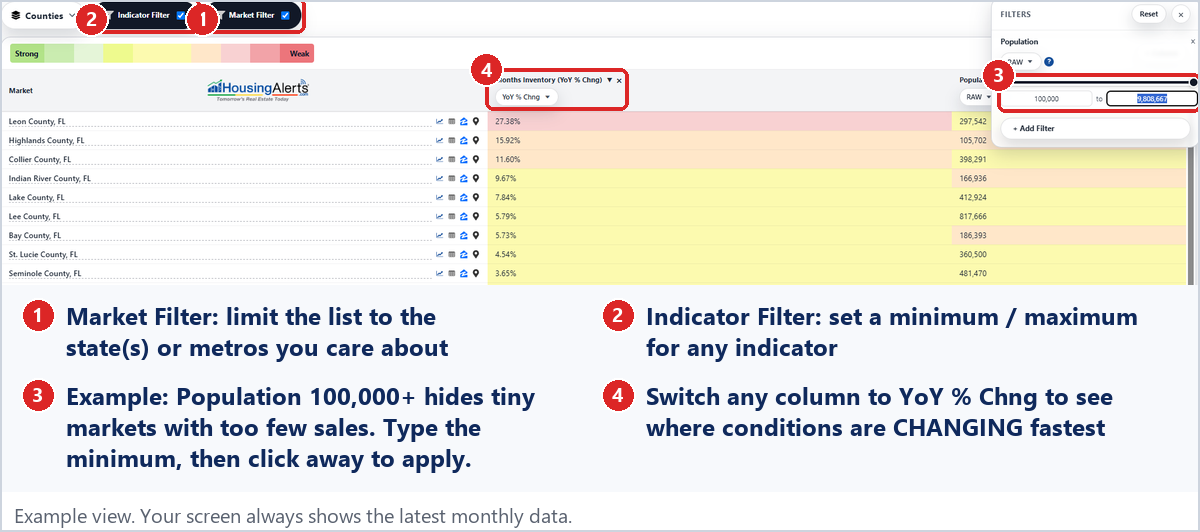
- Click Market Filter and check your state(s) or specific metros.
- Click Indicator Filter → + Add Filter → Population (in the Fundamental indicators near the bottom of the menu). Type a minimum (100,000 is a good start), then click away from the box to apply.
- Switch a column to YoY % Chng to see where conditions are changing fastest among markets big enough to trust.
- Click Reset in the filter panel to clear everything.
The rule: macro before micro.
- Find a strong Metro first.
- Then drill down to its counties and ZIP codes.
A ZIP code strongly trends with its parent metro. You'll generally do far better in a strong metro with an average ZIP code than in a weak metro with a "hot" one.