
Summary: See every market in the country on one color-coded screen, then zoom into yours.
Steps
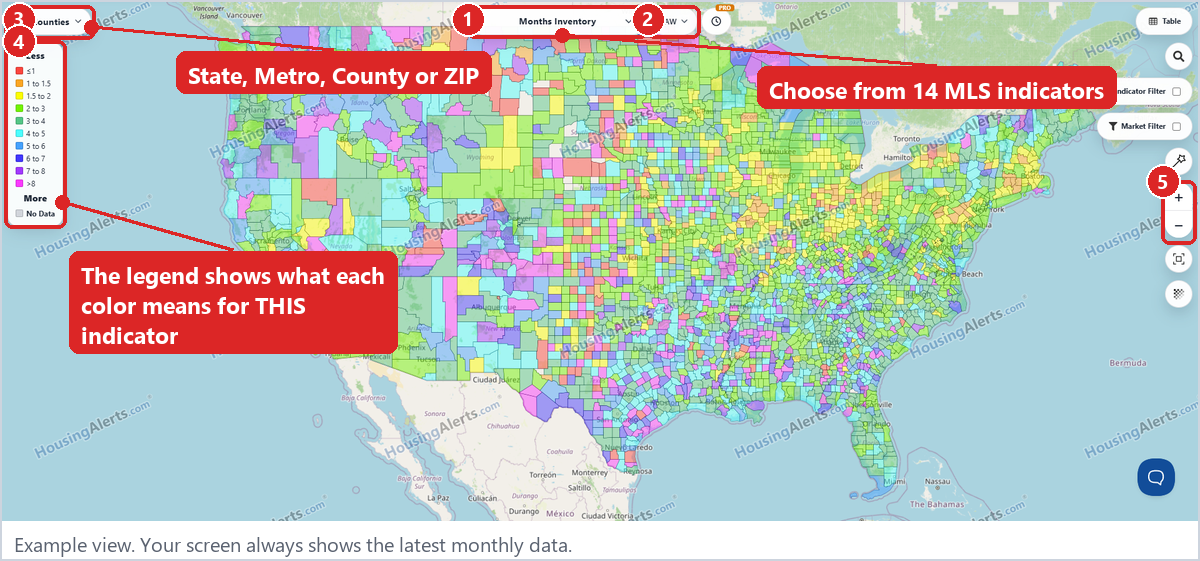
- Click Precision Market Tracker in the top menu. This is the Map.
- Pick an indicator from the menu at the top center. Your free account includes the 14 indicators under MLS Indicators.
- Pick a version (see below).
- Pick a level at the top left: States, Metro, Counties or ZIP Codes.
- Read the legend on the left. Colors mean different things for different indicators. In general, red, orange and yellow on the map indicate a 'stronger', appreciating and/or more vibrant market. Pink and purple generally indicate a relatively weaker market.
- Zoom with the + / – buttons or your mouse wheel.
Choosing a version
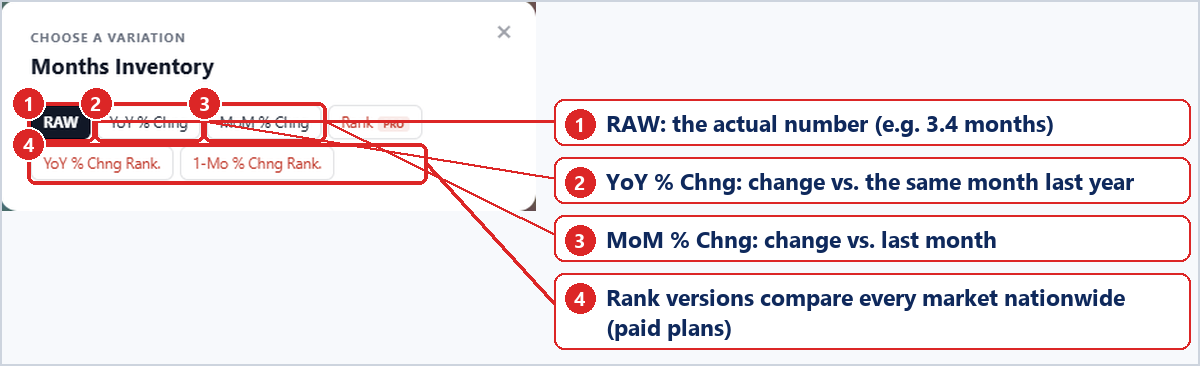
- RAW: the actual number.
- YoY % Chng: change vs. the same month last year.
- MoM % Chng: change vs. last month.
- Rank versions compare each market against every similar market nationwide. They're included with paid plans.
Tip: Switch to YoY % Chng to see what's changing, not just what is. Then look for places where the color jumps at a county line.
Note: Gray "No Data" areas have too few sales to give a reliable reading. That's on purpose.