
Summary: Sort and compare thousands of markets by the indicators you care about.
Steps
- Click Table (right side of the Map) or Custom Tables in the top menu.
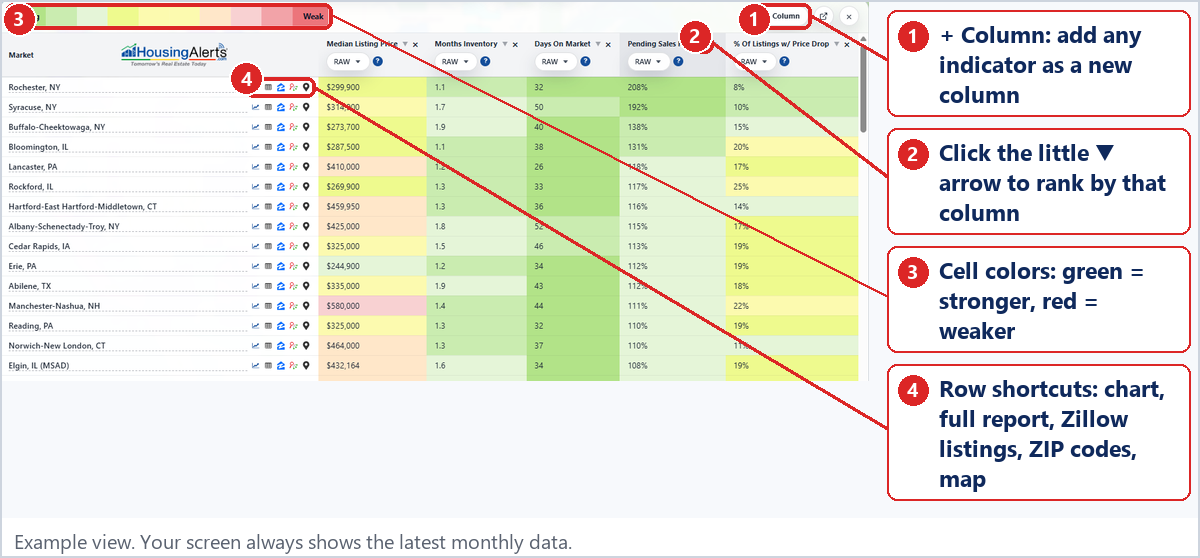
- Click + Column to add indicators.
- Click the small ▼ next to a column name to rank every market by that column.
- Remove a column with its ×.
Reading the Table
- Colors: a simple 3-color traffic-light scheme. Red is 'stop' (weaker), yellow is 'caution' and green is 'go' (stronger).
- Row shortcuts (icons next to each market): chart · full report · Zillow listings · ZIP codes · location on map.
Starter tables
- Investors: Months Inventory, Days On Market, Pending Sales Ratio, % Of Listings w/ Price Drop
- Realtors: Days On Market, New Listings, Pending Sales, % Of Listings w/ Price Drop (at the ZIP level)
- Homeowners: your county plus its neighbors, compared on the four vital signs